

Element reference
Test run
Test run
A test run is a planned execution of selected test cases in one project. Creating a run creates one test run result per selected case.
Relations
| Related element | How it connects |
|---|---|
| Project | Required owner |
| Test run result | One row per selected case |
| Test case | Selected into the run |
| Assignee | Optional default for new results |
Fields
| Label | Technical name | Type | Required | Validation | Default |
|---|---|---|---|---|---|
| Name | test_run_name | string | Yes | Max 500 characters | - |
| Description | test_run_description | HTML | No | Max 2500 characters | - |
| Status | test_run_status | enum | Yes | See enumerations | - |
| Assignee | assigned_to | user id | No | Copied to new results when adding cases | - |
| Project | project_id | id | Yes | - | - |
Enumerations
Status (test_run_status)
| Value | Meaning |
|---|---|
PENDING | Created, not started |
IN_PROGRESS | Execution ongoing |
COMPLETED | Finished |
CLOSED | Closed without further work |
Setting status to COMPLETED or CLOSED sets completed_at. Returning to PENDING or IN_PROGRESS clears it.
Page
Details and Activity.
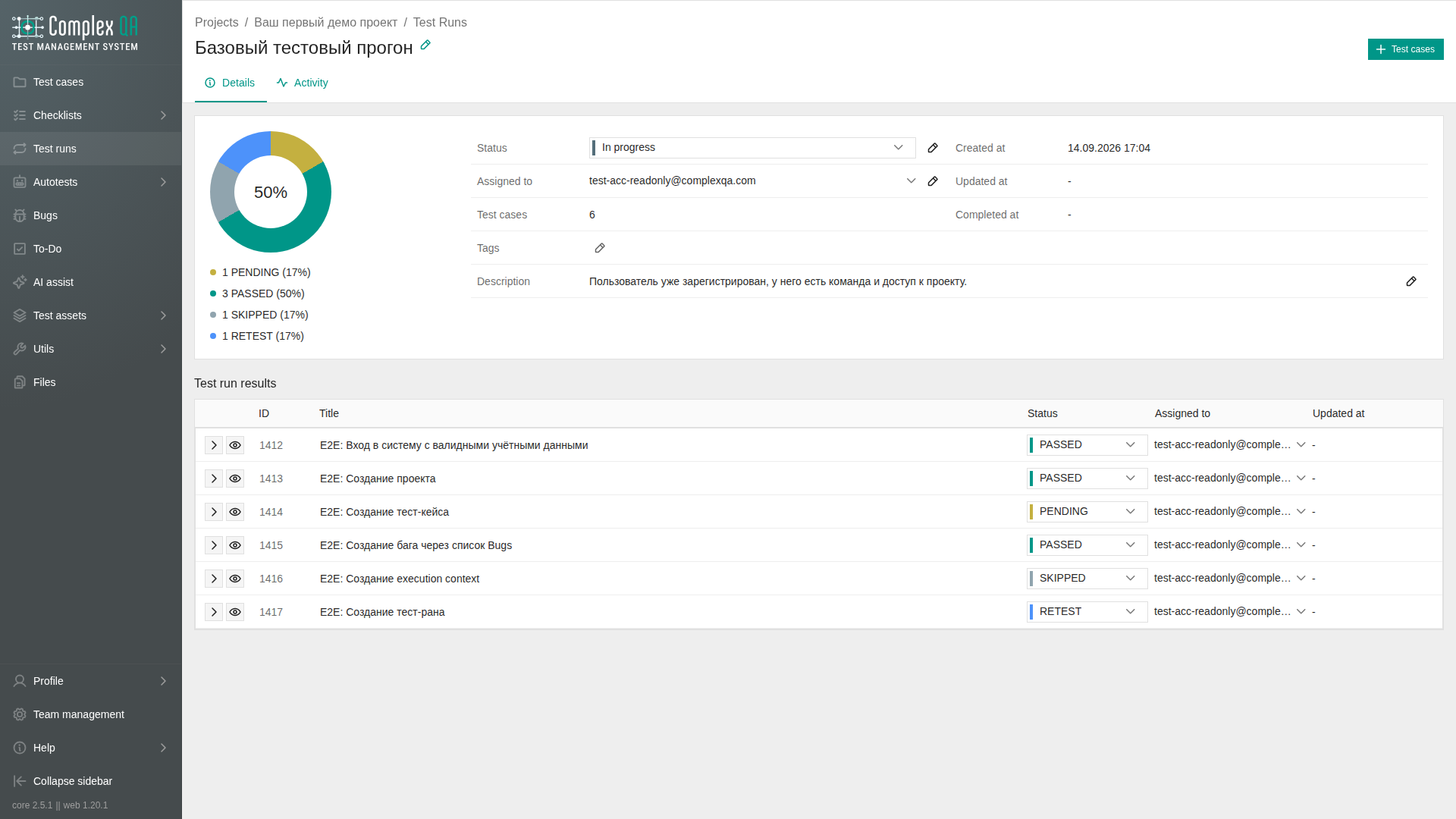
Details shows a chart of result statuses and one field block: status, assignee, case count, tags, description, created, updated, and completed. Custom properties sit in that same block. Status and assignee are selectors and save as soon as you change them. Description uses the visual editor. Cancel leaves without saving. Save writes the HTML. The pencil opens the editor.
Results are one list. There is no view switch and no view settings. Each row can open the result or a preview. The preview shows the case, this run, status, assignee, dates, description, and linked bugs when any exist. Status and assignee on the row save immediately.
The case count is the number of loaded results. A field that is not on the run is not shown.
Rules
- Case selection on create: a list of case ids,
ALLfor every case in the project, or omit selection - the backend defaults to all project cases. - A case already in the run is skipped when you add cases later. A second result row is not created.
- If a test case is deleted from the project, its results are removed from all runs. The run itself stays.
Limits
- An autotest run is a different element. Do not use this page for Playwright launches.
Did this page help?