

Element reference
Test case
Test case
A test case describes what to verify in a project. It can include preconditions, steps, and an expected result. Cases without a suite sit at the root of the project catalog.
Relations
| Related element | How it connects |
|---|---|
| Project | Required owner of the case |
| Test suite | Optional parent in the suite tree |
| Test case step | Ordered steps of the case |
| Bug | Optional links on the case Bugs tab |
| Test run result | Created when the case is included in a test run |
| Custom properties | Team-defined slots on the case details page |
Fields
| Label | Technical name | Type | Required | Validation | Default |
|---|---|---|---|---|---|
| Title | test_case_title | string | Yes | Max 90 characters of the stored text | - |
| Description | test_case_description | HTML | No | Max 350 characters | - |
| Status | test_case_status | enum | Yes | See enumerations | - |
| Complexity | test_case_complexity | enum | No | LOW, NORMAL, HIGH | - |
| Importance | test_case_importance | enum | No | LOW, NORMAL, HIGH | - |
| Time to execute | test_case_time_to_execute | integer | No | Estimated minutes | - |
| Preconditions | preconditions | HTML | No | Max 2900 characters | - |
| Expected result | expected_result | HTML | No | Max 2900 characters | - |
| Suite | test_suite_id | id | No | Suite in the same project | - |
| Assignee | assigned_to | user id | No | Shown in Tasks when status is open | - |
Enumerations
Status (test_case_status)
| Value | Meaning |
|---|---|
PENDING | Not started |
IN_PROGRESS | Being written or prepared |
COMPLETED | Ready for execution |
CLOSED | No longer used |
The mark next to a status uses the shared status color. The same meaning uses the same color on other elements. IN_PROGRESS is not the same color as blocked or skipped.
Page
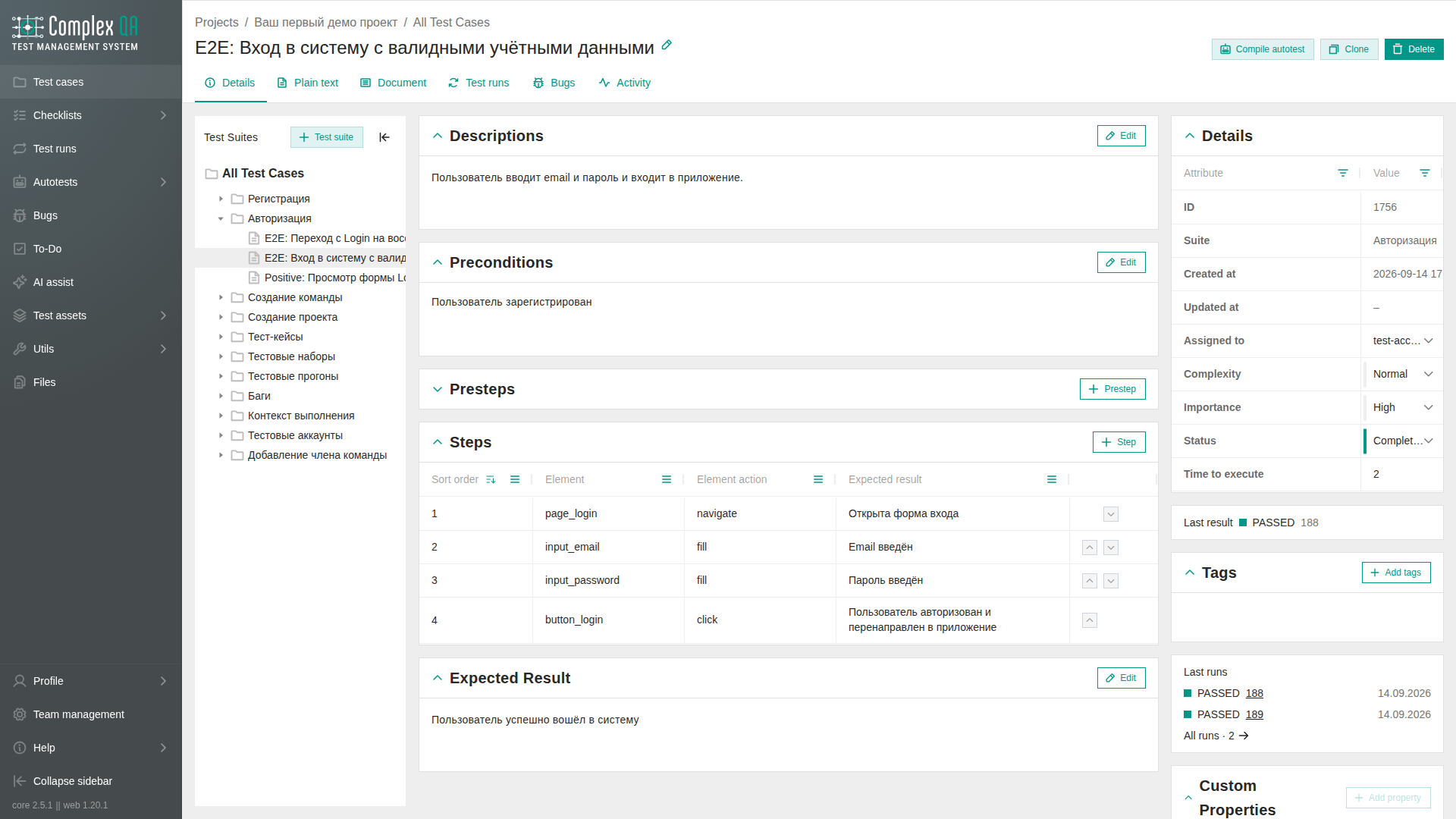
Tabs on the test case page: Details, Plain text, Document, Test runs, Bugs, Activity.
Details is two columns. The left column holds the description, preconditions, presteps, steps, and expected result. Empty preconditions and empty presteps open collapsed. Steps stay as their own block. The right column holds attributes, tags, custom properties, and up to five latest test run results. A last-result line is shown only when a result exists. Drag the left edge of the right column to change its width. The width is stored in this browser.
Document, directly after Plain text, is a read-only sheet of the same test case. A section with no text is omitted. This tab does not edit the case.
The list of cases: Test case listing views.
Rules
- Clone case copies the case and all its steps.
- Delete removes the case and its steps. Results for that case are removed from all test runs in the team; the runs themselves stay.
- Custom property slots come from the team catalog. Empty slots stay visible. You cannot add ad-hoc fields on the case.
- Optional text fields (description, preconditions, expected result) can be cleared after they already had text. Saving an empty value leaves the field empty.
- The title stores characters as typed. A quote and
&each count as one character. HTML tags in the title are removed before the length check. A title that is too long returns a field error, not an internal error. - Description, preconditions, and expected result accept the tags
b,i,p,a,strong,ul,ol, andli. The limit counts the stored text.
Limits
- The case does not execute itself. Execution happens through a test run and a test run result.
- Autotest steps are a separate element type. Do not confuse them with test case steps.
- Compile an autotest from this case: Creating an autotest from a test case.
Did this page help?