

How-to
Project general tab
Project general tab
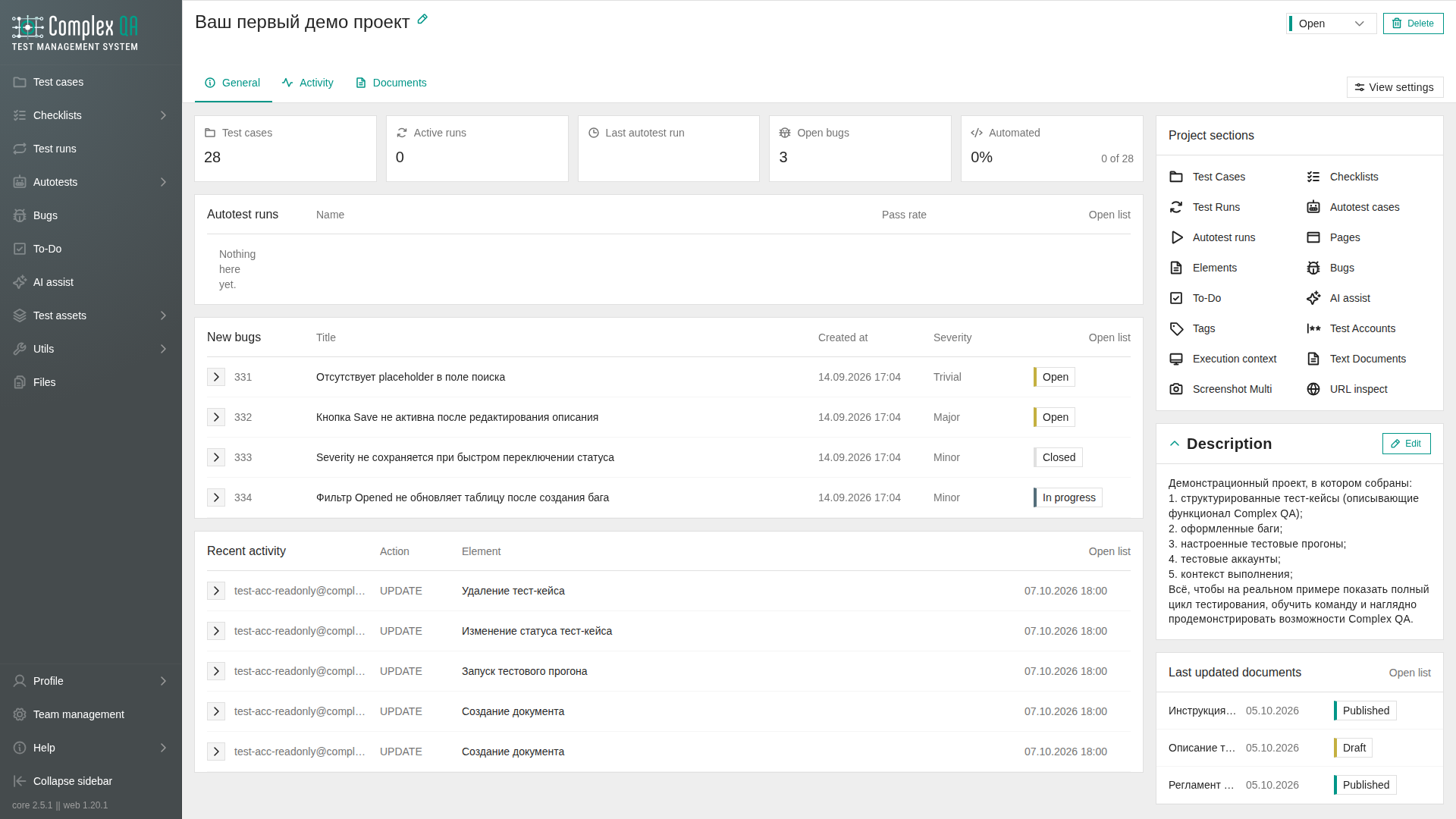
The project card opens on General. The tab shows summary cards, recent lists, project sections, and the description. Activity and Documents are the other tabs.
Role: a team member who can see the project.
Prerequisites
A project is open.
Steps
- Open the project from the project list.
- Stay on General.
- Open View settings on the tab row to choose the run kind, how many rows each recent list keeps, and which blocks stay visible.
Summary cards
Five cards sit above the recent lists. They do not show a change over the last 30 days.
| Card | What it shows |
|---|---|
| Test cases | Number of test cases |
| Active runs | Runs in PENDING or IN_PROGRESS for the selected run kind |
| Last run | Pass rate and passed-of-total for the latest run of that kind, when the run has results |
| Open bugs | Unresolved bugs: OPEN, TRIAGE, IN_PROGRESS, ON_HOLD, REOPENED |
| Automated | Share of test cases that have an autotest. The fraction is those test cases out of all test cases. The percent is hidden when the project has no test cases |
Runs in view settings chooses test runs or autotest runs for Active runs, Last run, and the recent runs list. Until a choice is saved, this tab uses autotest runs. That default is not the same as the project list, which starts on manual test runs.
A missing last run does not show a stand-in rate.
Recent lists
Each block draws its skeleton, shows the loading indicator, and loads on its own. The row count is 3, 5, or 10. Until a count is saved, each list shows 5 rows.
| Block | Rows |
|---|---|
| Runs | Latest test runs or autotest runs, with pass bar and status |
| New bugs | Latest bugs, with date, severity, and status |
| Recent activity | Who, action (CREATE, UPDATE, DELETE), element name, and time. A bare element identifier is not shown. If the element has no name, that cell stays empty |
| Last updated documents | Title, date without time, and status |
Column labels sit on the same grid as the row values. The go button is a fixed control on the left. Text in the next cell does not cover it.
Project sections and description
Project sections is a two-column list of links into the project: test cases, checklists, test runs, autotests, autotest runs, pages, elements, bugs, to-do, AI assistant, tags, test accounts, execution contexts, text documents, Screenshot Multi, and URL inspect. There is no overview sidebar on this card.
The description is editable text on the right.
Drag the left edge of the right column to resize it. The width is stored in this browser for the project card, from 280 to 720 pixels, starting at 380. It is not the width of the test case side panel. On a narrow screen the resize handle is hidden.
Did this page help?