

How-to
Autotest step authoring
Autotest step authoring
Autotest step authoring builds a Playwright scenario on the autotest card: action, Target, Value, and optional timeout. After save, steps are ready for syntax check and for an autotest run.
The source of truth for Target, Value, and TEST_ACCOUNT rules is the data file autotest-actions.json in the documentation repository and the Autotest step reference. Per-action how-tos live under /en/autotests/actions/{action_name}.
Views on the autotest card
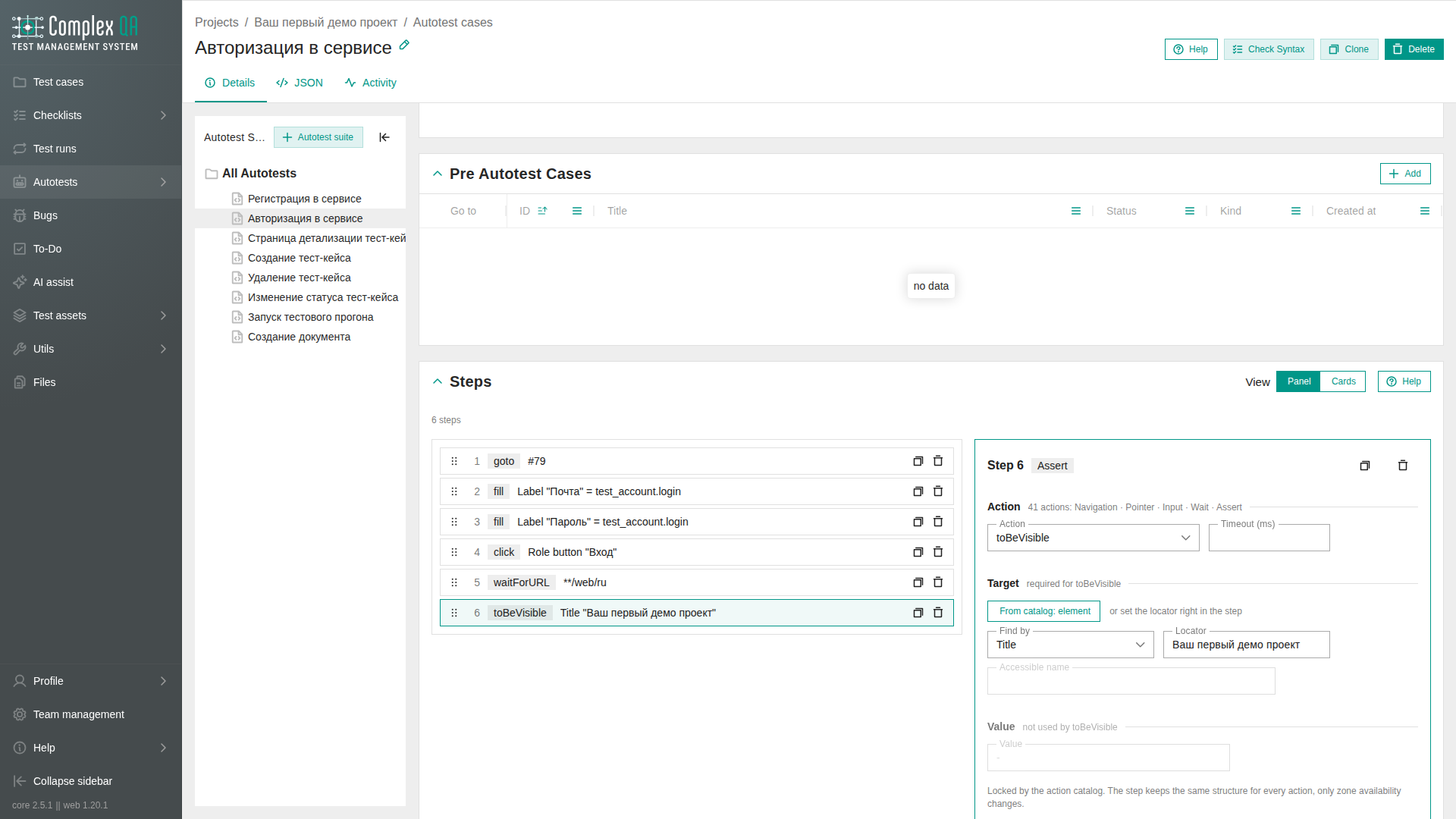
The steps block has a View switch with two layouts. The step itself is the same.
| Label in the UI | Layout |
|---|---|
| Panel | Step list on the left, editor for the selected step on the right |
| Cards | Each step is its own card; the editor opens under the selected step |
The browser remembers the choice. If the steps block is narrow, the switch is hidden and Cards stays on: the panel does not fit next to the list.
Prerequisites
- The project has a
CASEorCOMMONautotest. Creation: Autotest creation. - A team member role with write access to the project.
- For login and password from
TEST_ACCOUNT, the queuedCASEhas a bound test account. - Shared locators already exist in the object repository when you reuse them.
Steps
- Open Autotests in the project and open the autotest card.
- Add an autotest step.
- Choose
action_namefrom the action catalog (see the table below and the per-action how-tos). - Fill Target when the action requires it:
- an element from the object repository, or
- an on-step locator: kind and value from
ROLE,LABEL,PLACEHOLDER,TESTID,TEXT,TITLE,ALT,CSS,ID,NAME,XPATH,SELECTOR.LABELis the field label;TEXTis visible text;TITLEis the title attribute;ALTis alternative text (do not confuse them): Autotest step. Forpress, Target may stay empty: the key goes to the page.
- Fill Value when the action requires it. For
toHaveAttribute, put the attribute name in Value; put the expected contents inexpected_value, which may stay empty. FortoHaveCSS, put the property name in Value and the computed value inexpected_value; both are required. - Choose the Value source:
INLINE(text on the step) orTEST_ACCOUNT(fieldloginorpasswordof the account). Details: Test account values in steps. - Optionally set
timeout_msfor a wait or assertion. - Optionally run Check syntax.
- Save the step and the autotest.
The step appears in scenario order on the card. Next - neighboring steps or Autotest run creation.
Action catalog (links)
Full rules table: Autotest step. Binding a catalog Target: Binding a Target from the object repository.
Example: sign-in (goto + fill + click)
Mini scenario: open the sign-in page, fill login and password from the test account, click the sign-in button. JSON array of steps (copy-paste):
[
  {
    "action_name": "goto",
    "value_text": "/login",
    "value_source_type": "INLINE"
  },
  {
    "action_name": "fill",
    "target": { "kind": "LABEL", "value": "Email" },
    "value_text": "login",
    "value_source_type": "TEST_ACCOUNT",
    "value_source_field": "login"
  },
  {
    "action_name": "fill",
    "target": { "kind": "LABEL", "value": "Password" },
    "value_text": "password",
    "value_source_type": "TEST_ACCOUNT",
    "value_source_field": "password"
  },
  {
    "action_name": "click",
    "target": { "kind": "ROLE", "value": "button", "name": "Sign in" }
  }
]
A screen capture is a run option (Result screenshot, Screenshot on failure), not an action_name. Typical false failures (import, URL glob, host after COMMON, strict mode): How to author autotest steps without false failures.
Did this page help?