

How-to
Project list
Project list
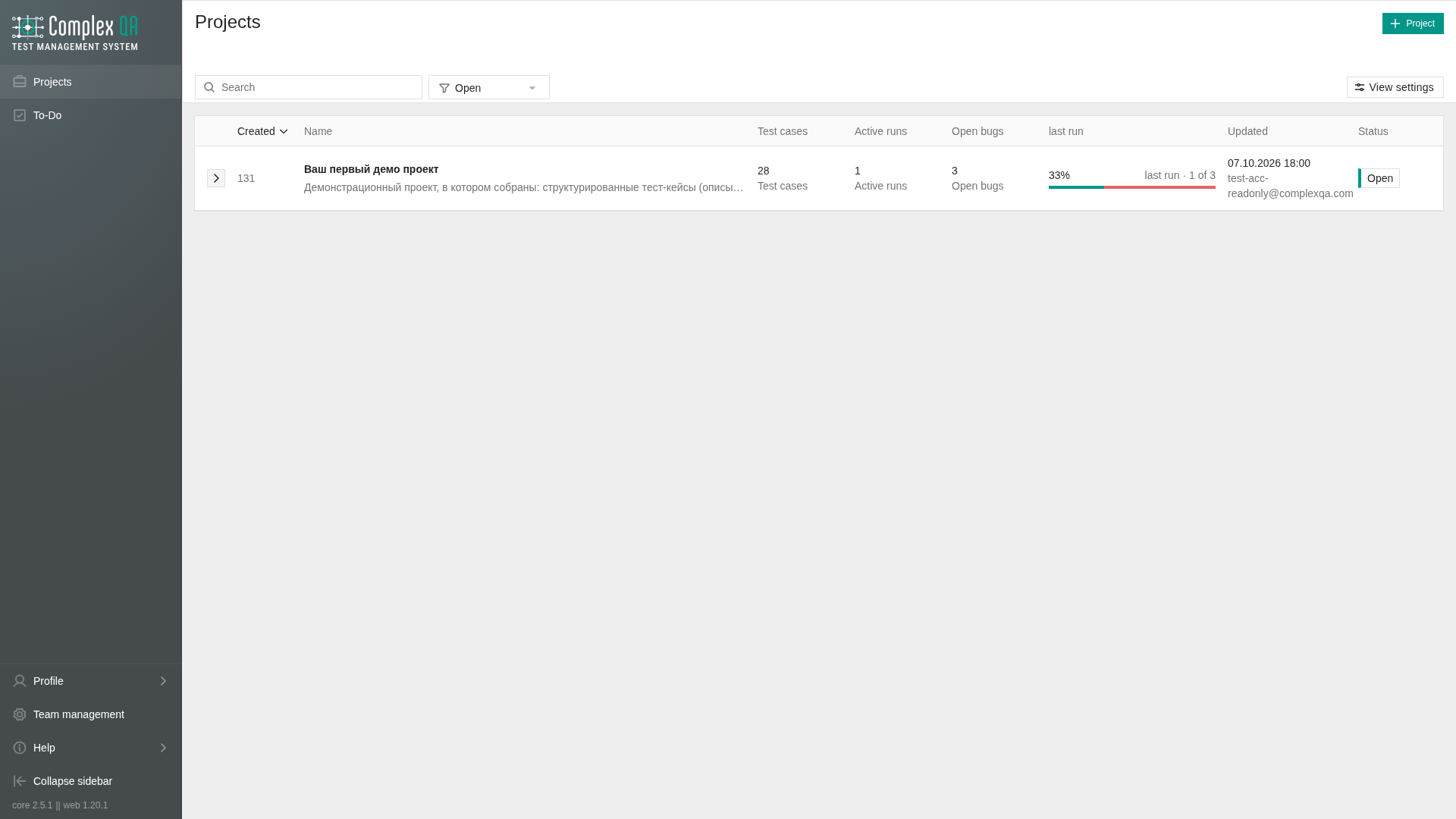
The team project list is one view: List. Search, status, and view settings apply to that list.
Role: a team member who can see the team. Creating a project requires write access.
Prerequisites
The team workspace is open.
Steps
- Open Projects.
- The list opens with status
OPEN. Switch the status filter toCLOSEDor All to see other projects. There are no Open / Closed / All tabs. - Search by identifier, name, or description. HTML in the description is ignored: the list and the search use plain text.
- Open View settings to change density, sort, and which runs the row counts.
Row
The project name is the only bold text. A bordered button opens the project. The status is a chip: white fill, full border, colored left edge.
Comfortable density shows the plain-text description and the labels under the counts. Compact hides that description and those labels. Until a density is saved, the list opens as Comfortable.
Counts on the row:
| Count | Meaning |
|---|---|
| Test cases | Test cases in the project |
| Active runs | Runs in PENDING or IN_PROGRESS. A cancelled autotest run is not active |
| Open bugs | Unresolved bugs: OPEN, TRIAGE, IN_PROGRESS, ON_HOLD, REOPENED. Same set as the Opened tab of the bug list |
| Last run | Pass rate of the latest run, when that run has results |
The pass rate is passed results divided by all results of that run. A run with no results does not show a rate.
What to show chooses the runs behind Active runs and Last run: Manual runs (test runs) or Autotest runs. Until a choice is saved, the list uses manual test runs.
Sort
The list opens sorted by Created, newest first. Created is the order projects were added, not a separate created-at clock.
You can sort by name, last update, created, test case count, active run count, open bug count, last-run pass rate, or status. Click a column header or pick the field in view settings. Empty values stay at the end. A new last activity does not reorder the list unless you sort by last update.
The last view settings are stored in this browser for the project list, not separately per team.
Did this page help?